Google’s Stitch: The UI/UX Genie for Non-Designers — But Can It Replace Pros?
- Aug 11, 2025
- 5 min read
In early 2025, Google quietly dropped a design bombshell: Stitch, an AI-powered UI/UX creation tool built on its advanced Gemini models. The timing was no accident — the launch came right after Google’s acquisition of Galileo AI, a startup that had been working on turning natural language prompts into high-quality user interface designs. Now under Google’s wing, Galileo’s technology has been supercharged by Gemini and wrapped into a single tool that promises to take an idea from plain text all the way to a functional, coded design.

If that sounds like magic, it kind of is — but like most AI magic, it comes with a few sleights of hand and a couple of “don’t look too closely” caveats.
What Is Stitch by Google?
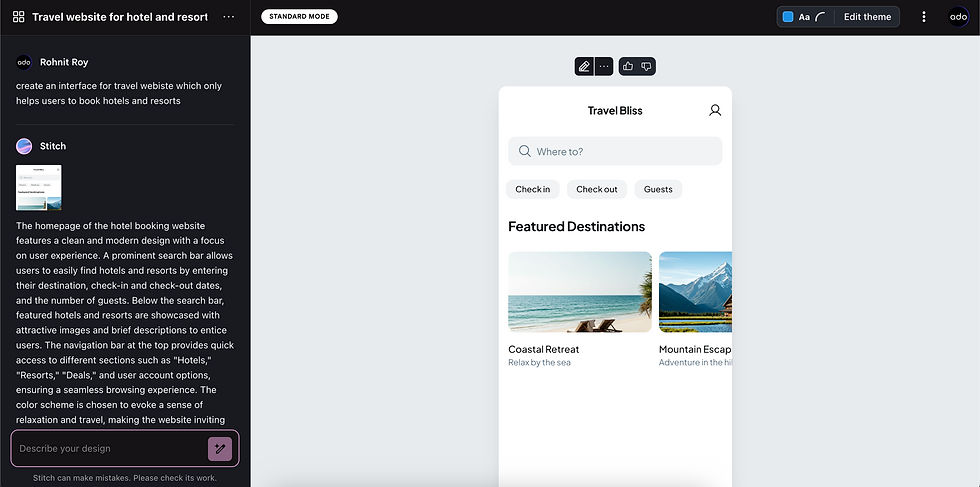
Think of Stitch as a design assistant + front-end developer in one box. You feed it a prompt — for example:
“Generate a marketing landing page for a company that sells software to train AI. Use dark mode, have a hero section with a humanoid robot in a chair connected to wires, and show features in a bento grid layout.”
Within a minute or two, Stitch spits out:
A complete Figma artboard with auto-layout applied.
Responsive HTML and Tailwind CSS code.
Optional variations based on style tweaks like colors, corner radii, and fonts.
And it doesn’t stop at simple layouts. In experimental mode, you can upload your own mockup or wireframe and ask Stitch to reimagine it according to your prompt.
In essence, it’s Microsoft’s Sketch concept from 2018–19 — which turned hand-drawn UI sketches into digital designs — but evolved for the generative AI era. Only now, instead of basic line translation, you get a design you can instantly iterate on or export to production-ready code.
Why Google’s Acquisition of Galileo AI Matters
Before Stitch, Galileo AI was gaining traction in the design tech community for its ability to take text-based prompts and create surprisingly refined mockups. It was like DALL·E for interface design — quick, creative, but still requiring a human touch.
Google’s acquisition signals two things:
They’re serious about owning the UI/UX automation space — especially for startups and teams that can’t afford full design departments.
They see a path to integrate design generation directly into their broader AI ecosystem, possibly linking Stitch to tools like Google Sites, Firebase, and even Android Studio.
By combining Galileo’s design translation expertise with Gemini’s multimodal reasoning, Google is positioning Stitch as more than a novelty — it could become a foundational tool for product teams.
Why Founders and Venture Owners Should Care
If you’ve ever been in a startup’s early days, you know the pain:
You have a great idea.
You need a usable UI to pitch it, test it, or sell it.
You don’t have a designer.
Developers can code layouts, but without visual polish, it looks amateur.
That’s where Stitch shines.
1. Rapid Prototyping Without a DesignerType out your product vision, and in minutes you have a functional layout you can demo to investors, customers, or internal teams.
2. Faster Go-to-Market CampaignsNeed a landing page for a new feature or product drop? Stitch can create one before your coffee gets cold.
3. Developer-Ready Code on Day OneNo more waiting for design handoff — export clean, responsive HTML and Tailwind code directly to your code editor.
4. Cost Savings for Early-Stage TeamsInstead of hiring a designer + front-end dev for initial drafts, founders can use Stitch to handle the “first pass” and bring in pros later for refinement.
5. Experimentation PlaygroundWant to test three different dashboard layouts? With Stitch, it’s three prompts and a few minutes, not weeks of design work.
A Real-World Test: The Reviewer’s Verdict
One early reviewer put Stitch through multiple scenarios, from generating marketing pages to creating mobile dashboards. Here’s the breakdown:
The Good:
Instant Figma Export → Paste designs directly into Figma with full auto-layout applied.
Clean HTML Output → Well-structured Tailwind code that’s not overly verbose.
Responsive by Default → Designs adapt across screen sizes without heavy manual edits.
Prompt Flexibility → Adjust color themes, typography, and layout in seconds.

The Not-So-Good:
Pixelated Images → Hero sections and complex visuals sometimes render in low resolution.
Weak Visual Grouping → Text elements and UI components sometimes lack proper spacing or hierarchy.
Auto-Layout Overkill → Everything is locked to auto-layout, making fine-tuning in Figma harder.
Manual Tweaks Still Needed → Even with HTML, spacing, alignment, and accessibility require human refinement.
In one example, the tool was asked to create a dark-mode mobile dashboard for tracking e-learning sales. It nailed the color scheme adjustment when prompted but still failed to group related data cleanly — something an experienced designer would instinctively fix.
So… Is This the End for UI/UX Designers?
Not even close.
The reality is, Stitch is only threatening to low-skill, entry-level designers who rely on templates and lack strong design fundamentals. As the reviewer bluntly put it:
“Only the ones who suck.”
Why? Because high-value UI/UX work goes far beyond arranging boxes on a screen:
It’s about deep user research.
It’s about brand consistency and emotional impact.
It’s about accessibility, interaction patterns, and conversion psychology.
Stitch doesn’t replace that — it accelerates it.
For great designers, Stitch is a tool to:
Skip repetitive layout work.
Test ideas faster.
Free up time for higher-value design strategy.
For non-designers, Stitch is a way to:
Create “good enough” drafts for validation.
Avoid blank-canvas paralysis.
Hand something tangible to a pro for polishing.
Where Google Can Improve Stitch
If Google wants Stitch to become an industry standard, here are five areas to address:
Better Image RenderingPixelated hero sections break first impressions. High-resolution assets should be the default.
Smarter Visual HierarchyStitch needs a stronger grasp of grouping, alignment, and spacing for better readability and flow.
Brand Kit IntegrationLet users upload logos, fonts, and brand palettes so generated designs instantly match their identity.
More Accurate Prompt InterpretationWhen adjusting designs (e.g., changing layout sections), Stitch should follow instructions more faithfully.
AI Design AuditsBuilt-in feedback mode that flags inconsistencies, poor contrast, or weak accessibility.
Given how quickly Google iterates its AI products, these improvements could arrive sooner than we think.
The Bigger Picture: Where This Is Headed
Stitch is part of a broader shift in design and development:
AI as a design collaborator rather than a replacement.
Democratization of product creation — letting more people participate in building digital products without formal training.
Acceleration of idea-to-market cycles, where MVPs can be designed, coded, and tested in days, not months.
In the next 12–18 months, it’s likely we’ll see:
Stitch integrating directly into Google Workspace, allowing Docs or Slides to instantly generate app prototypes.
Cross-linking with Firebase for instant deployment from design to live product.
API access so other platforms (like Webflow, Framer, or Wix) can tap into Stitch’s generation capabilities.
The endgame? A world where 80% of a product’s UI is generated in minutes, and humans focus on the final 20% that makes it truly unique and delightful.
The Bottom Line for Founders
If you’re a founder or venture owner without a design background, Stitch is a game-changer — not because it eliminates the need for designers, but because it eliminates the barriers to starting.
Here’s the smart way to use it:
Use Stitch to create fast, cheap, iterative prototypes.
Get your product to market-testing phase faster.
Bring in professional designers later to refine and elevate the experience.
In other words, Stitch won’t replace the art of great design — but it can help you get to the canvas much faster.
And as with most AI tools, those who learn to work with it rather than fight against it will have the competitive edge.


The article about Stitch as a UI tool shows how design is becoming easier for non-designers, and I liked how it highlights creativity with simple tools. It made me think of a time when I struggled to manage multiple subjects and needed help staying organized. During that time, I used online Statistics class help to understand concepts better while keeping up with my work. It showed me that using the right support can make learning more manageable and less stressful.